
Wondering how to check if your taxes are paid? The answer starts directly with the IRS—not with what a third party tells you. Given that the IRS processes over 266.6 million returns and forms every year, the agency’s official records are always the most reliable source to confirm when a payment was applied to your account.
To help you through this process, this post explains how to review payments through your IRS Online Account. It also includes what to check if a tax preparer submitted the payment, how to validate state and county tax payments, and which IRS warning signs can help you avoid fraud.
Need support after a scam? Join our community today.
How to Check If My Taxes Are Paid
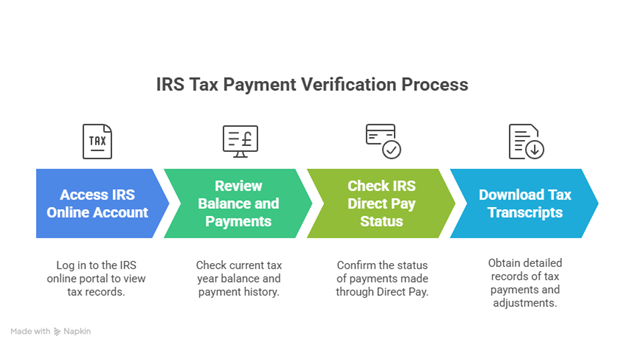
To verify if your taxes are paid, the IRS Online Account is the most direct way to see what the agency recorded. The platform shows year-by-year balances, payment history, and the exact dates the IRS processed each entry.
In recent months, we’ve seen some clients tricked by trusted professionals. One case involved a lawyer who went to jail for misappropriating client funds — a client nearly lost everything because the taxes were never paid. These are not random incidents.
The steps below help confirm what is posted and identify issues that may go unreported if the review is done only through a bank or a third party:
1. Review “Balance” and “Payments” in the IRS Online Account
This page is where the IRS lists every payment, adjustment, and update. It gives a clear view of what the system recognized for each tax year.
It’s the simplest way to confirm “How can I check if I paid my taxes?”, especially when the goal is to compare what was sent with what the IRS registered. A careful check helps detect differences early. Inside the account, focus on:
- Current year balance, especially if recent payments were sent.
- Payments posted, with the exact amount and date shown in the system.
- Adjustments that changed the amount owed.
- Status of a payment plan, if one is active.
- Entries that don’t match what was submitted, such as incomplete payments or amounts posted to another year.
If something here looks off, the next steps help clarify what happened and guide the correction process through the IRS tools.
2. If the Payment Was Made Through IRS Direct Pay, Review the Payment Lookup
Once the Online Account is checked, the next step is confirming the status of a payment made through Direct Pay. The confirmation number opens a page that shows the result of the transaction in real time.
This step is useful when a bank statement shows a charge, but nothing appears in the IRS account, or when a third party says the payment was submitted. Payment Lookup shows:
- Processed: the IRS posted the payment.
- Pending: the bank has not finished confirming the transaction.
- Returned: the payment was rejected, often due to incorrect account information.
- Canceled: the transaction stopped before completion.
Checking this page early helps avoid interest and letters that may arrive if the payment never reaches the IRS. It also specifies if the transaction should be sent again or if bank details need correction.
3. Download Transcripts for Complete Evidence
When a detailed record is needed, IRS transcripts offer the most complete view of how each payment was received. These documents show completed payments, internal updates, and changes made after processing.
They work as official proof for lenders, state agencies, or reviews that require documentation. The transcripts that provide the most clarity are:
- Tax Account Transcript: lists applied payments, adjustments, and internal activity.
- Record of Account: combines account history with information from the tax return, helpful for audits or state-level requests.
These records help identify issues such as payments posted to the wrong year or amounts that don’t match what was originally sent.
What Happens If You Don’t Check Your Payments
The situations below show what can go wrong when a tax payment doesn’t get processed the way it should. These real examples help explain how a payment can go missing, show the wrong amount, or be applied to the wrong tax year:
Case 1: Payment marked as “returned”
A taxpayer used Direct Pay close to the deadline. Later, the status appeared as “returned.”
What happened?
- The bank never withdrew the amount, so the IRS did not post anything.
- The issue surfaced through Payment Lookup, since no alert came from the bank.
When issues like this continue unnoticed, interest automatically starts to accumulate. The IRS continues counting the balance, and the total changes each day without the taxpayer realizing it, as the system updates amounts automatically.
Case 2: Payment applied to the wrong tax year
Another taxpayer saw the payment listed in their account, but under the wrong tax year.
What happened?
- The IRS treated it as a general deposit, which caused the system to place it in the wrong year.
- The correction came through an updated transcript that showed the year the payment truly belonged to.
Without that review, balance notices would have started to show up. When the IRS detects differences between posted payments and what should be reflected, letters go out with updated amounts that may include interest.
Case 3: Preparer sent less than the amount provided
Another taxpayer gave their preparer the exact amount needed for the payment. Later, something did not match in their IRS account.
What happened?
- The Online Account reported a payment lower than what was given to the preparer.
- The difference was realized only after reviewing the IRS portal, since the document the preparer provided did not show the adjustment.
Have questions about dealing with scams? Contact us for support.
How to Check Your Property Tax Payment
When someone searches “how can I check if I paid my taxes”, it’s easy to assume the IRS handles every tax record. But property taxes follow a different route. The confirmation comes directly from the county treasurer or tax collector, since each county operates its own system and updates records independently.
Most counties present the same core elements homeowners look for when reviewing a payment: the current status, any balance due, and the digital receipts issued through the portal.
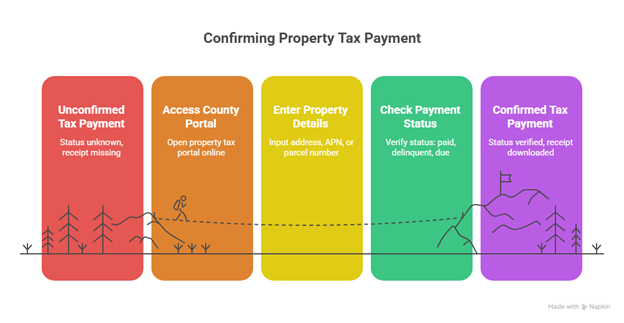
If you want to make sure the payment was recorded correctly, the usual flow includes:
- Opening the county’s property tax portal.
- Enter the address, APN, or parcel number.
- Checking the status shown (“Paid,” “Delinquent,” “Balance due,” or “Zero balance”).
- Confirming the date the payment was posted.
- Downloading the digital receipt issued by the county.
Here is a comparison table with counties frequently searched in the U.S. It shows how each one displays the “PAID” status and the type of information available inside their portals.
How counties display the “PAID” status for property taxes
| County / State | How the property is searched | Where “PAID” appears | Information provided |
| Los Angeles County (CA) | Address, AIN, parcel number | “Bill Status” | Payments, fiscal year, PDF receipts |
| Cook County (IL) | PIN or address | “Payment Status” | Annual history, posted amounts |
| Harris County (TX) | Tax account | “Account Balance / Paid” | Receipts, posting dates |
| Miami-Dade (FL) | Folio or address | “Tax Summary” | Status, discounts, receipts |
| Maricopa County (AZ) | Parcel number | “Tax Payment History” | Payments sorted by date, earlier charges |
| Orange County (CA) | Parcel number | “Tax Bill Details” | Fiscal year, payments, receipts |
| King County (WA) | Address or parcel | “Payment Details” | Applications and full payment history |
| Polk County (IA) | Parcel number or address | “Installment Status” | Current balance, payment history, receipts |
How to Confirm a Property Tax Payment Made by Someone Else
When someone else made the payment, it helps to gather records that show the county posted the full amount. The most useful documents include:
- The county’s digital receipt with the date and payment total.
- A screenshot of the “Paid” or “Zero balance” status inside the official portal.
- The third party’s bank record showing the exact charge.
These files make it easier to compare what was sent with what appears in the county system. That’s how errors surface, like partial amounts, entries posted to the wrong account, or payments tied to another parcel because a digit was typed incorrectly.
Example
Imagine a situation where the payment was sent on time, but the balance stayed active. When the owner checked the county portal, they noticed the payment was linked to another parcel with a nearly identical number.
A small variation in the parcel number can generate that error. The bank record won’t reveal the issue, but the “Tax Status” section does. Fixing it usually requires sending the proof of payment and a short request to the tax collector, so the record can be corrected.
How To Protect Data And Assets While Confirming The Payment
When you’re checking how to check if my taxes are paid, you’re logging into systems that hold personal information—like your Social Security number, bank account details, home address, and tax records.
Every time you access, share, or store this data, there’s a risk it could be exposed in a data breach. That risk gets bigger if you’re using a public connection or depending on someone else to do it for you.
- Check activity inside your IRS or county accounts: If you see logins or updates you don’t recognize, someone else might be trying to access your information.
- Activate the IRS IP PIN: It’s a free tool that stops anyone from filing a tax return using your data—especially useful after a data breach.
- Set credit alerts or place a freeze: If something feels off, like odd emails or account changes, this step helps stop identity thieves from opening accounts in your name.
Learn What to Do Now to Avoid Tax Surprises Later
When questions come up about how to check if my taxes are paid, the best thing you can do is review everything inside the official account. That one step can keep a mistake from turning into fees, problems with the IRS, or stress that could’ve been avoided.
At Cryptoscam Defense Network, we share guidance for people who want help without feeling alone during the process. And if you’re also asking how unpaid taxes could affect other financial decisions, check out this resource: Can You Buy a House If You Owe Taxes?
We Want to Hear From You!
Fraud recovery is hard, but you don’t have to do it alone. Our community is here to help you share, learn, and protect yourself from future fraud.
Why Join Us?
- Community support: Share your experiences with people who understand.
- Useful resources: Learn from our tools and guides to prevent fraud.
- Safe space: A welcoming place to share your story and receive support.
Find the help you need. Join our Facebook group or contact us directly.
Be a part of the change. Your story matters.